
Introduction to AI-Powered Design
The landscape of user interface design has undergone a revolutionary transformation. What once required years of training and expensive software can now be accomplished in minutes using AI-powered design tools like Komposo.
In this comprehensive guide, we'll explore how you can harness the power of artificial intelligence to create professional, stunning user interfaces without any prior design experience. Whether you're a startup founder, indie developer, or entrepreneur with a vision, understanding how to leverage AI for UI design is quickly becoming an essential skill.
Understanding How AI UI Design Actually Works
Before diving into the practical steps, it's helpful to understand what's happening under the hood. AI design tools use large language models and generative AI to interpret your descriptions and transform them into visual interfaces.
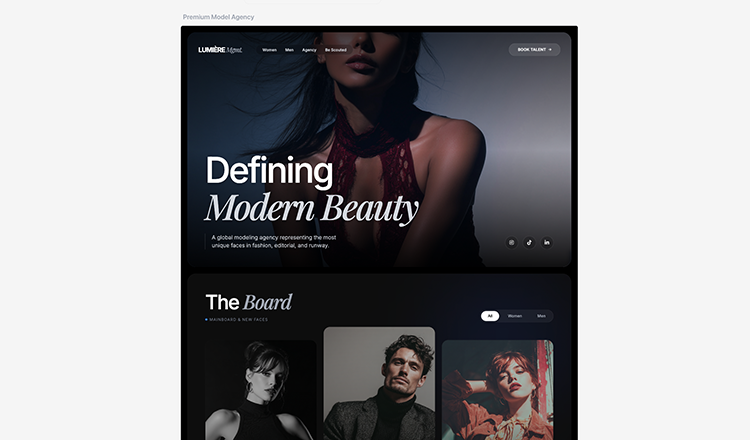
When you provide a prompt describing your desired design, the AI analyzes multiple factors:
- Semantic understanding: The AI parses your description to understand the purpose, style, and components you need
- Design pattern recognition: Drawing from millions of existing designs, the AI applies proven UI/UX patterns
- Visual hierarchy: The system automatically arranges elements based on importance and user flow
- Style consistency: Colors, typography, and spacing are coordinated for a cohesive look
This technology doesn't replace human creativity—it amplifies it. You still bring the vision and make the decisions; the AI handles the technical execution that traditionally required specialized skills.
Why AI Design Tools Are Game-Changers
Traditional design workflows have always been bottlenecks in product development. Here's why AI design tools are fundamentally changing the industry:
- Speed: Generate complete UI designs in seconds, not hours or days
- Accessibility: No formal design background or training required
- Iteration: Test dozens of concepts rapidly without starting from scratch
- Cost-effective: Reduce dependency on expensive design resources
- Consistency: Maintain design system coherence across multiple screens
The Traditional Design Challenge
Before AI design tools, creating a professional UI meant one of two paths:
- Spending months learning complex software like Figma, Sketch, or Adobe XD
- Hiring expensive designers at $50-150+ per hour
Both options created significant barriers for startups, indie developers, and entrepreneurs who just wanted to bring their ideas to life quickly and affordably.
Even experienced developers often struggled with design. You might be a brilliant coder capable of building complex applications, but translating that functionality into an intuitive, visually appealing interface is an entirely different skill set.
How AI Changes the Equation
AI-powered design tools like Komposo eliminate these barriers by understanding your intent and translating it directly into polished designs. Simply describe what you want, and the AI handles the visual execution—including layout, color schemes, typography, and component design.
This democratization of design means ideas can move from concept to visual reality in minutes rather than weeks. It's particularly powerful for:
- Validating ideas quickly: Test whether your concept resonates before heavy investment
- Stakeholder communication: Show investors or clients what you're building
- Developer handoff: Generate actual code that developers can implement immediately
Getting Started with Komposo
Let's walk through the basic workflow for creating your first AI-generated UI design. The process is surprisingly straightforward, but mastering it requires understanding a few key principles.
Step 1: Describe Your Vision
Start by describing what you want to create. The more specific you are, the better results you'll get. Consider including:
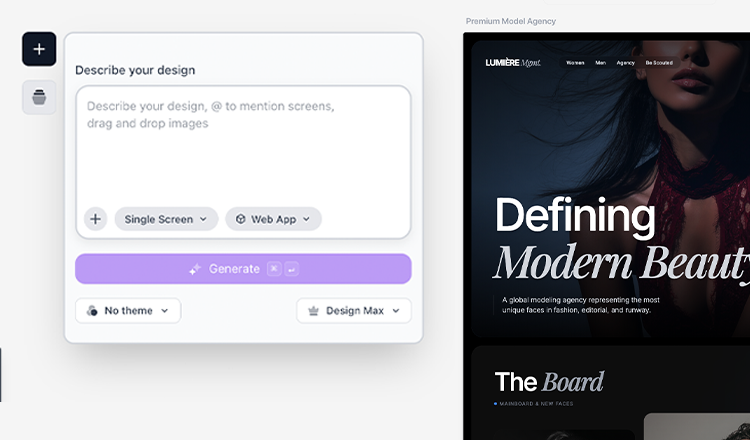
- Application type: Mobile app, web dashboard, landing page, or web application
- Primary purpose: E-commerce, social media, productivity, fitness, finance, etc.
- Visual style: Minimal, bold, corporate, playful, futuristic, or reference a specific brand aesthetic
- Target audience: Who will use this interface affects design decisions
- Key features: What core functionality should be visible in the design
For example, instead of simply saying "Create a fitness app," try: "Create a modern fitness tracking mobile app with a dark theme and vibrant accent colors. Include a home screen with today's workout summary, progress charts showing weekly activity, and a social feed where users can share achievements. Target audience is millennials who want an engaging, gamified fitness experience."
Step 2: Review and Refine
Once the AI generates your initial design, the real creative process begins. You can:
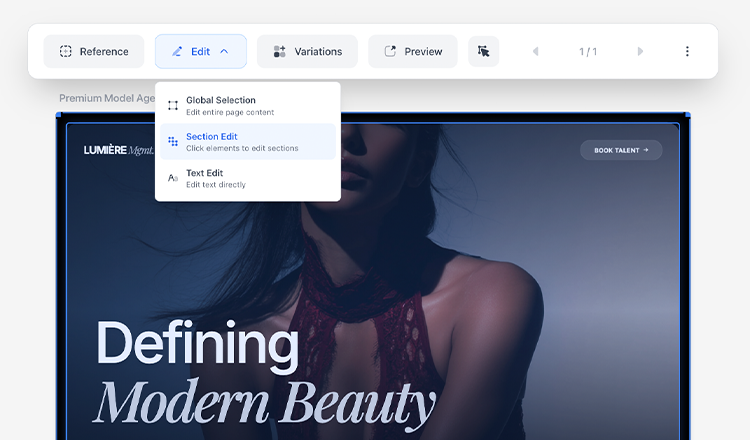
- Request targeted changes: Ask for specific modifications like "Make the header more prominent" or "Use a warmer color palette"
- Adjust individual elements: Modify colors, typography, spacing, or layout arrangements
- Add or remove components: Include additional features or simplify the interface
- Iterate until satisfied: Each refinement builds on the previous version
This iterative approach is where AI truly shines. Traditional design would require starting over or making tedious manual adjustments. With AI, you can explore variations quickly and find the perfect solution.
Step 3: Export Your Design
When you're happy with the result, Komposo offers multiple export options:
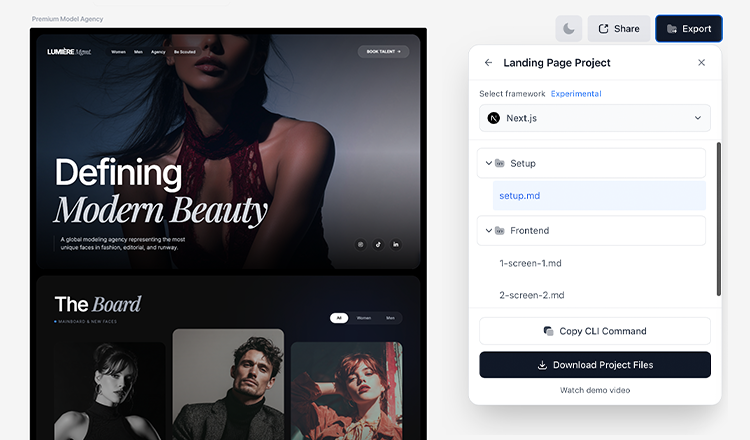
- Production-ready code: Get clean HTML/CSS or React components ready for implementation
- Design files: Export for further editing in traditional design tools if needed
- Assets and images: Download individual elements for use across your project
- Multiple formats: Support for various frameworks and development workflows
Best Practices for AI Design Prompts
The quality of your output depends heavily on the quality of your input. Mastering the art of prompt writing will dramatically improve your results. Here are proven strategies for writing effective AI design prompts:
Be Specific About Purpose and Context
Vague prompts lead to generic results. Always provide context about what the interface is for and who will use it.
Instead of: "Create a dashboard"
Try: "Create a SaaS analytics dashboard for marketing teams at mid-sized companies, showing key metrics like conversion rates, traffic sources by channel, and campaign performance with week-over-week comparisons. Include a clean sidebar navigation and a notification center."
Include Visual References and Style Direction
Mention specific styles, brands, or aesthetics that inspire you:
- "Modern and minimal like Apple's product pages"
- "Bold and colorful like Stripe's dashboard"
- "Professional and corporate like Salesforce"
- "Fun and approachable like Notion"
- "Data-dense but clean like Linear's interface"
These references give the AI concrete visual anchors to work from.
Specify Technical Requirements
Include relevant constraints that affect the design:
- "Mobile-first responsive design that works on all screen sizes"
- "Accessible with proper contrast ratios meeting WCAG AA standards"
- "Following Material Design guidelines for Android consistency"
- "Dark mode optimized for reduced eye strain"
- "Touch-friendly with adequate tap target sizes for mobile users"
Structure Complex Requests
For multi-screen projects, break down your request into logical sections:
- Start with the primary screen (usually home or dashboard)
- Describe the navigation structure
- List secondary screens and their purposes
- Note any recurring elements or patterns
Common Use Cases for AI UI Design
AI design tools excel across a wide variety of scenarios. Here's where they deliver the most value:
Landing Pages and Marketing Sites
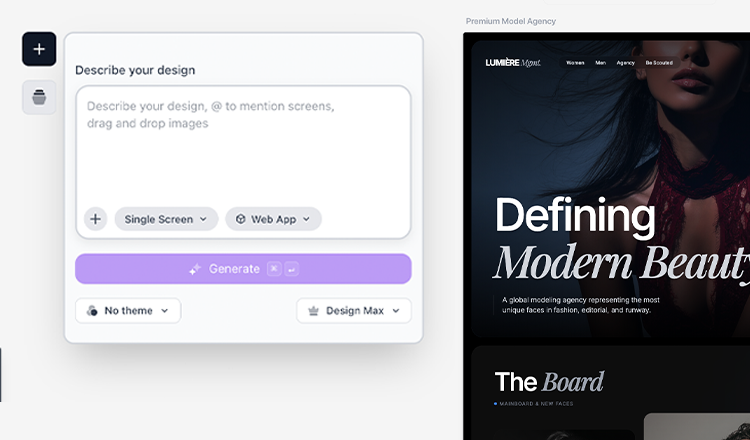
Perfect for quickly testing different value propositions and visual approaches before investing in full development. Create multiple variations to A/B test messaging, layouts, and calls-to-action.
Mobile App Mockups
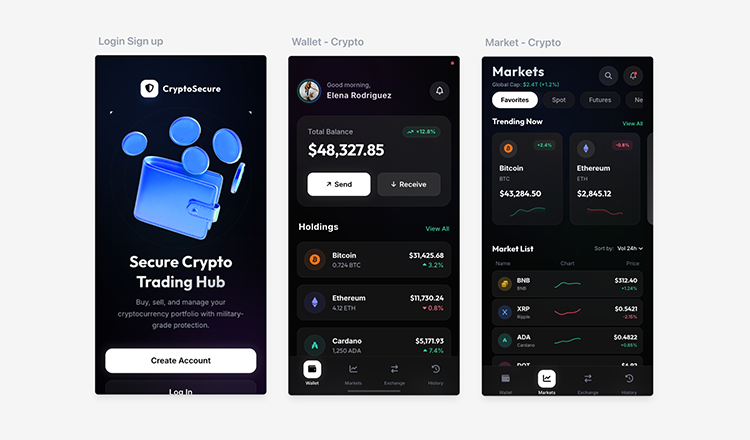
Create comprehensive app designs to validate ideas, share with stakeholders, or use for investor presentations. Generate full user flows from onboarding to core features.
Dashboard and Admin Interfaces

Generate complex data visualizations, admin panels, and internal tools without the typical design overhead. These interfaces are often overlooked but critically important for user experience.
E-commerce Experiences
Design product pages, checkout flows, and category layouts that convert browsers into buyers. Test different approaches to product presentation and cart design.
SaaS Application Interfaces
Build the screens your software needs—settings pages, user management, billing interfaces, and feature-specific views.
Common Mistakes to Avoid
As you begin your AI UI design journey, watch out for these frequent pitfalls:
Being Too Vague
Generic prompts like "Create a nice app" will give you generic results. Always specify the purpose, style, and key features.
Overloading Single Prompts
Trying to describe an entire application in one prompt often leads to confusion. Break complex projects into individual screens or sections.
Ignoring Mobile Responsiveness
Always consider how your design will work across device sizes. Specify "mobile-responsive" or "mobile-first" when relevant.
Skipping the Iteration Phase
The first generated design is rarely the final answer. Plan to refine and iterate—that's where the best results come from.
Forgetting User Experience Fundamentals
AI can create beautiful interfaces, but you still need to think about user flow, information hierarchy, and usability. The AI is a tool; you're still the designer.
Conclusion
AI-powered design tools represent a fundamental shift in how we create user interfaces. By removing traditional barriers to entry, they enable anyone with an idea to create professional-quality designs that would have required specialized skills and significant investment just a few years ago.
Whether you're a startup founder validating a concept, a developer who needs UI designs for a side project, or simply someone with a creative vision, tools like Komposo make it possible to bring your ideas to life faster and more affordably than ever before.
The key is to start experimenting. Your first designs won't be perfect, but with practice, you'll learn how to communicate with the AI effectively and produce results that rival professional design work. The technology will only continue to improve, and those who master it now will have a significant advantage.
Ready to start creating? Try Komposo free and experience the future of UI design today.
Related Articles
How to Create Beautiful Mobile App Designs with AI in Minutes
Learn how to use Komposo's AI mobile design generator to create stunning iOS and Android app interfaces. Complete guide with prompt templates, tips, and step-by-step instructions for creating professional mobile UI designs.
How To Pitch 3 UI Design Directions Without 3x The Work
Learn how to present multiple design directions to clients in minutes instead of hours. This step-by-step guide shows designers and agencies how to generate design variations, share interactive prototypes, and win more pitches without burning out.
Free UI Templates Library: Ready-to-Use Designs for Mobile Apps, Web Apps & Landing Pages
Discover Komposo's free UI template library with production-ready designs for mobile apps, web apps, and landing pages. Browse, preview, and customize templates with AI-powered design tools.